
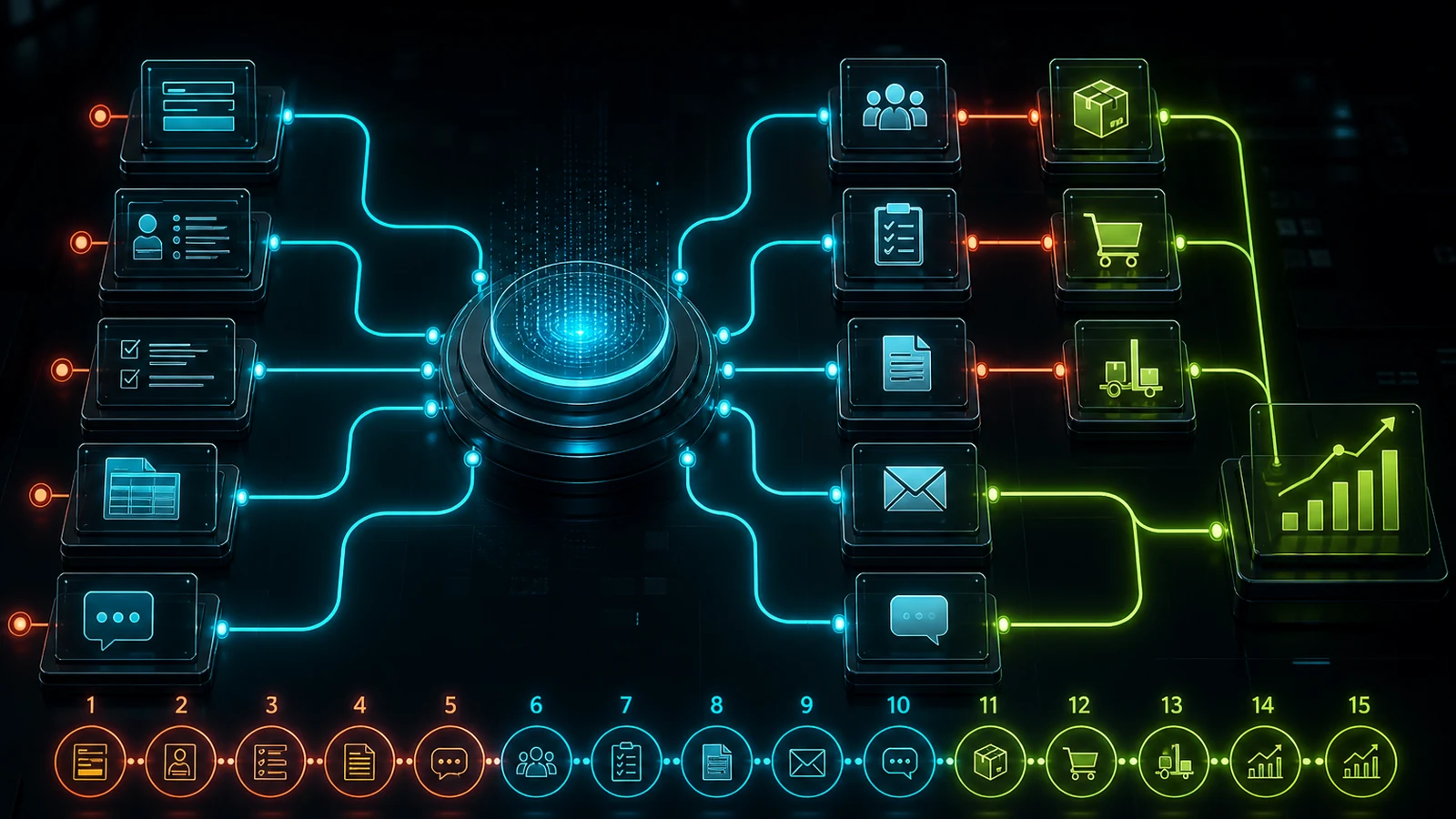
Business automation is often reduced to a few email rules or form notifications. A well-designed system can capture a customer request, create the CRM record, assign an owner, prepare a quotation draft, schedule follow-up and update management reporting.
Not every company can automate 80% of all work. But up to 80% of the steps in a well-selected, repetitive and clearly governed process may be automation candidates. The goal is not to remove people; it is to remove data carrying and reminders so people can focus on decisions and relationships.
Automation, integration and AI are not the same
- Rule-based automation: predetermined actions such as “create a CRM record when a form arrives.”
- Integration: safely moves data between CRM, email, accounting, messaging and inventory.
- Artificial intelligence: handles variable inputs through classification, document extraction, summarization and drafting.
- AI agent: can plan and execute multiple steps within defined goals, tools and permissions while preserving approval for critical actions.
A reliable architecture does not use these layers interchangeably. Deterministic rules belong in automation, transfer belongs in integration, interpretation belongs in AI and high-impact decisions remain human.
An end-to-end example
Customer form → CRM → task → quotation draft → email → WhatsApp notification → follow-up → reporting
When a prospect submits a form, the system validates contact details, checks for an existing company and creates an opportunity. It assigns an owner by product group. AI summarizes the request and highlights urgency. Approved pricing rules create a quotation draft. A salesperson reviews and sends it; customer engagement updates the follow-up task. The dashboard reports source, response time, proposal and revenue.
1. Lead capture and validation
Collect website, campaign, event and chatbot leads in one queue. Validate contact formats, preserve consent and source, and merge duplicates so salespeople no longer assemble spreadsheets.
2. CRM creation and enrichment
Create company, person, industry, request and campaign records automatically. Enrich domain, country and sector through authorized sources. Keep inferred data separate from information supplied by the prospect.
3. Lead scoring and routing
Prioritize by budget, company size, fit, territory, timing and engagement. Route high-value opportunities to senior sales, existing customers to account owners and support requests to service teams.
4. Tasks and service levels
Create first-contact, quotation, follow-up and close-reason tasks. Notify the owner before the SLA expires and escalate genuine delays. Reminder automation is often one of the fastest revenue wins.
5. Quotation preparation
Create a draft using product, service, discount, currency, tax, lead-time and segment rules. AI can suggest line items from free text; an authorized person should approve final pricing and terms.
6. Personalized email and follow-up
Draft messages from industry, conversation summary and opportunity status. Create follow-up based on meaningful engagement. The goal is contextual assistance, not sending the same sequence to everyone.
7. WhatsApp notifications
Use approved templates for appointments, orders, shipping, service and payment reminders. Manage commercial messaging consent, the correct number, timing and user preferences centrally.
8. AI-assisted customer service
Limit the assistant to approved knowledge, show order status only after authorization and escalate low-confidence questions. Add a summary to the support record so the customer does not repeat the story.
9. Scheduling and resource planning
Offer slots based on calendar, duration, skills and location. Fill cancellations from a waiting list and report capacity and no-show rates.
10. Invoicing and payment flow
Create a draft invoice from an approved order, transfer it to accounting, send reminders and close status after payment. Use approval thresholds instead of letting AI change financial records directly.
11. Inventory and purchasing
When stock falls below threshold, suggest a purchase quantity using demand, open orders and lead times. Flag critical parts and normalize supplier quotations for comparison. Automatic ordering needs safe limits and approval.
12. Order and operations status
Combine order, production, quality, packing and shipping in one timeline. If a step slips, notify the next team and the customer with the right context. Self-service status reduces phone traffic.
13. Document and data processing
Extract fields from quotations, invoices, technical requests and applications; flag missing or inconsistent data. Ask for review when confidence is low. Preserve the original, extracted values and corrections.
14. Management reporting
Combine CRM, campaign, order and finance data. Daily and weekly summaries can show lead volume, response time, conversion, revenue, delays and forecast variance. AI can explain movements without changing the numbers.
15. Controlled AI agents
An agent can “find today's follow-ups, summarize CRM history, prepare email drafts and submit them for approval.” Tool permissions should be limited, actions logged and critical sending, payment or deletion steps approved by a person.
Which process should be automated first?
Score candidates on four dimensions:
- Volume: how often does it repeat?
- Time: how many minutes does each instance consume?
- Error and delay: what does failure cost?
- Standardization: how clear are input, decision and output?
Start with high-volume, time-consuming and measurable work with clear rules. Do not choose a low-volume, constantly changing, high-impact human decision as the first pilot.
How is success measured?
- Time per transaction,
- First response and completion time,
- Error, rework and duplicate rate,
- Proposal-to-order conversion,
- Volume handled per employee,
- Time to human support and resolution,
- Savings and additional revenue per automation.
Architecture principles for safe automation
Do not tie production workflows to one person's account. Store API secrets securely, apply role-based access, separate test and production, implement retry and error queues, use idempotency for critical actions and log each step. Define purpose, retention and deletion rules for personal data.
Track AI output with source, confidence and human corrections. Design explicitly which step is a rule, which is AI and which is a human decision instead of applying a vague “fully automated” label.
Frequently asked questions
Can a small business automate?
Yes. Lead capture, task reminders, quotation templates and appointment notifications are effective narrow starting points. A large platform investment is not required.
Are n8n and similar tools enough?
They are excellent for straightforward integrations. Custom backends and dashboards become relevant when permissions, distinctive UX, volume, complex data and auditability grow.
Will AI agents replace employees?
Good design removes repetitive coordination while keeping goals, relationships, exceptions and accountability with people. Role design and training are part of the automation project.
Where does WebWizz start?
WebWizz maps the process, ranks candidates by impact, effort and risk, and builds the first pilot around measurable KPIs. We can combine CRM, WhatsApp, email, inventory, reporting and a custom operations panel in one architecture. Explore our AI and custom software services.