
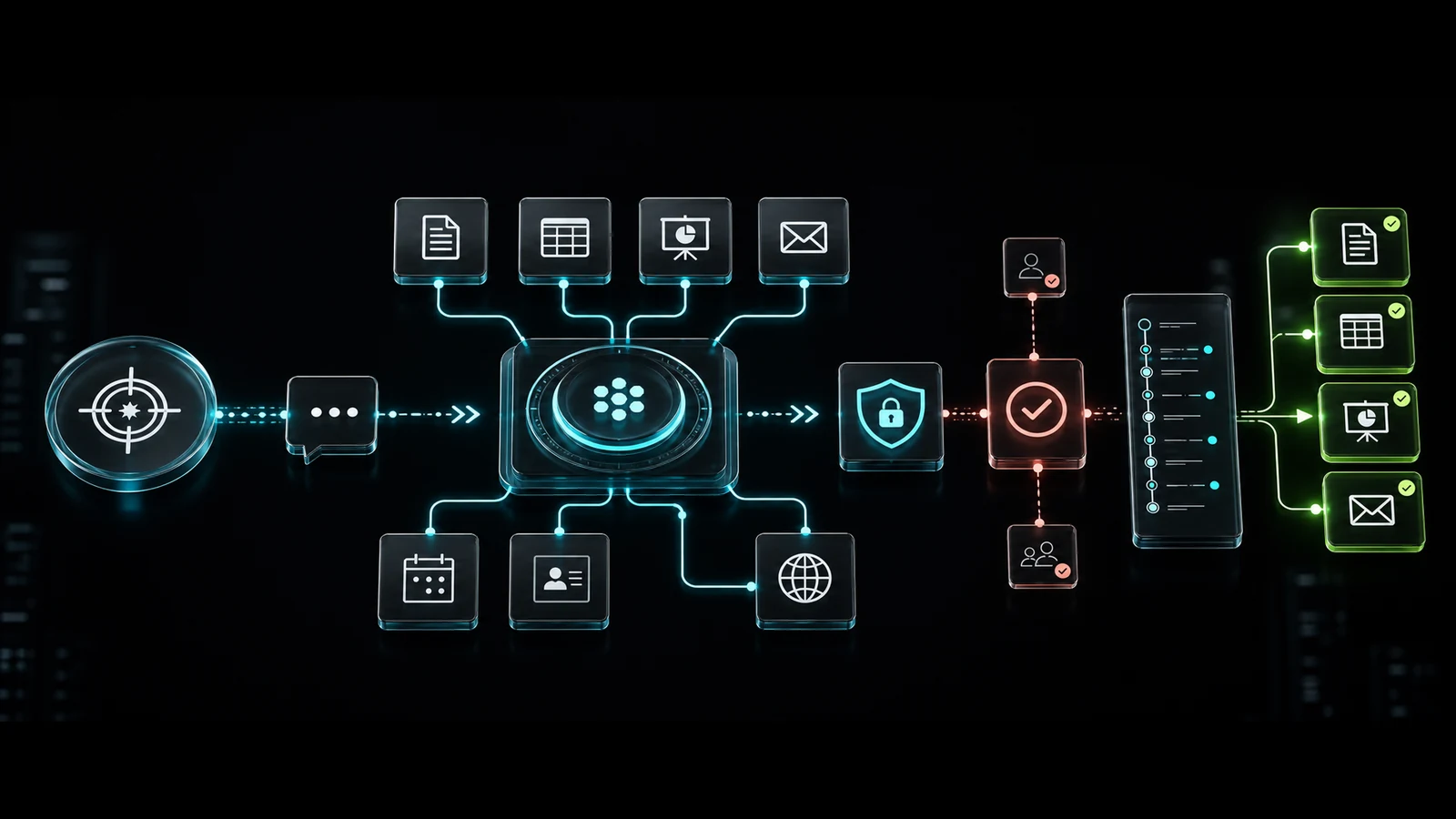
Businesses first met generative AI as a chat tool that could draft text, generate ideas and answer questions. Product direction is now changing. AI systems are moving from responses toward research across connected files and apps, decomposition of long tasks, creation of finished deliverables and execution of approved actions.
ChatGPT Work is an agent experience designed to turn a goal into multi-step work that may run for hours and produce finished outputs such as reports, presentations, spreadsheets, documents or web apps. Workspace agents turn repeatable business processes into shared, permissioned and manageable agents for a team.
OpenAI announced ChatGPT Work on July 9, 2026. It was introduced around gathering information from connected apps and files, working on longer tasks and creating complete materials. For companies, the key question is shifting from “Should employees use ChatGPT?” to “Which processes can we delegate to an agent, with which permissions and which controls?”
What is ChatGPT Work?
ChatGPT Work is an AI work mode that coordinates research, analysis, planning, execution and deliverable creation under one longer-running task. The user defines an objective, the agent breaks it into subtasks, gathers context from available apps, reports progress and requests approval for important actions.
According to OpenAI's current product notes, Work can also support scheduled tasks that run once, repeat or monitor for change. Plan, region and feature availability can evolve, so procurement decisions should be checked against current product documentation.
Chat vs. Work vs. workspace agents vs. automation
| Approach | Best Fit | Main Boundary |
|---|---|---|
| Chat | Questions, ideas, drafts and short analysis | The user directs each step |
| ChatGPT Work | Long research and finished deliverables | General-purpose; business context still needs configuration |
| Workspace agent | Repeatable, shared team workflow | Requires permission, ownership and lifecycle management |
| Rule-based automation | Clear triggers and deterministic steps | Less flexible with ambiguity and exceptions |
| Custom AI agent | Company-specific systems, policies and user experience | Higher engineering, testing and operational responsibility |
These options do not need to compete. A robust architecture lets an agent handle interpretation, planning and exceptions while pricing, payments, authorization and accounting remain deterministic software services. As discussed in our Agentic AI and n8n analysis, agents and controlled workflows usually work better together.
What are workspace agents?
A workspace agent is different from a personal conversation. It has a defined job, context, tool set and operating boundary. It can be built once and shared across a team to standardize processes such as researching sales opportunities, triaging support or producing a weekly metrics report.
OpenAI's workspace agents page highlights role-based access, app and action permissions, audit logs, monitoring and approval gates for sensitive operations. Those controls matter because knowing what an agent cannot do is as important as its capability.
Eight practical business use cases
1. Sales opportunity research
An agent can combine CRM accounts, approved company context and public information into an opportunity brief, meeting preparation and follow-up draft. Sending an email or changing a CRM stage can remain behind human approval.
2. Proposal and presentation preparation
It can turn discovery notes into scope, assumptions, schedule and proposal drafts, then create a presentation or workbook from a brand template. Final price, contract terms and commitments still need an authorized reviewer.
3. Customer-support operations
An agent can classify requests by topic, sentiment, urgency and customer value, draft an answer from the knowledge base and route the case. Refunds, account deletion or compensation are harder to reverse and should not run without approval.
4. Weekly management reporting
Sales, advertising, operations and support data can be assembled into a fixed report format with explanations of key movements. A useful agent also exposes sources, data timestamps and calculation methods.
5. Marketing content operations
Campaign research, editorial calendars, channel adaptation and performance summaries can be coordinated. Publishing access should remain separate, with brand, copyright, accuracy and sensitive-claim review owned by an editor.
6. Project management
Meeting notes can become decisions, risks, tasks and owners. The agent can monitor overdue work and prepare status summaries, while prioritization and resource allocation remain leadership decisions.
7. Finance and procurement pre-analysis
An agent can identify discrepancies across invoices, orders and budgets and build a review queue. Transfers, banking instructions, tax submissions and binding approvals are high-risk and require deterministic controls plus authorized human approval.
8. Internal knowledge and documentation
Scattered documents can become process summaries, onboarding packs and update proposals. Access must be filtered by team role so the agent does not summarize restricted information for an unauthorized user.
What does “AI coworker” mean?
“AI coworker” is powerful product language, but an agent is not equivalent to a human employee. It does not have natural accountability, institutional intuition or inherent permission boundaries. Its decisions are probabilistic; it may connect the wrong context, rely on stale information or follow malicious instructions embedded in an external source.
A more accurate model is a software actor with a specific job description, tool set, data scope, budget and oversight policy.
Architecture of an agent-ready business
1. Clear systems of record
Define where customer, price, contract and project data are authoritative. If an agent sees conflicting values in two systems, it needs an explicit rule for which one wins.
2. Connected-app and data scope
Connecting Drive, email, calendar, CRM or a project tool should not imply access to everything. Separate read and write access by folders, record types, groups and actions.
3. Tool and action contracts
Every tool needs an input schema, authorization check, timeout, retry, idempotency rule and useful error contract. A model request to “apply a customer discount” is not enough; the discount service must verify role, limit and promotion policy deterministically.
4. Human approval and reversibility
Email sending, record deletion, proposal pricing, order cancellation and external file sharing should pass through risk-based approval. Actions permitted without approval should be reversible wherever possible.
5. Observability and evaluation
Logging only the final response is insufficient. The business should be able to identify which agent used which tool and data source, on whose behalf and with what result. Completion rate, corrections, time, cost and incidents need ongoing review.
Security: least privilege and unique agent identities
In its February 2026 work on AI agent identity and authorization, NIST treats agent identification, authorization, auditability and prompt-injection mitigation as a distinct security challenge. A sound baseline includes:
- Register every agent with an owner, purpose, data scope and expiry date.
- Use a unique, auditable agent identity instead of a shared human account.
- Begin with read-only and least-privilege access.
- Treat instructions inside email, web pages and documents as untrusted data.
- Apply explicit policy to external sharing, record mutation and financial actions.
- Keep secrets out of prompts and memory; use a secure secret manager.
- Filter logs for sensitive data and align retention with company policy.
- Provide a kill switch, permission revocation and a recovery path.
Is ChatGPT Business data used for training?
OpenAI's business data privacy statement says organizational inputs and outputs in ChatGPT Business, Enterprise and the API are not used for model training by default. This does not remove risks created by connected third-party apps or internal over-permissioning.
For example, OAuth scopes requested by a Google connection need joint review across ChatGPT workspace settings and Google Workspace administration. Data source, retention, deletion, subprocessors, region and action permissions should be reviewed for every integration.
Which process is suitable for an AI agent?
Score a candidate from one to five across six dimensions:
- Frequency: how often does the process run?
- Human effort: how much time does each run consume?
- Data readiness: are the sources digital, current and authorized?
- Measurability: can success be evaluated objectively?
- Reversibility: can an incorrect action be corrected easily?
- Risk: what is the financial, legal, reputational or privacy impact?
A good first pilot combines high repetition, meaningful time savings, ready data and easy reversibility with low or moderate risk. “Run the entire company with AI” is not a pilot. “Prepare the approved weekly sales report for manager review” is measurable.
ChatGPT Work, workspace agent or custom agent?
| Need | Recommended Starting Point |
|---|---|
| Personal, variable, long-form research | ChatGPT Work |
| A consistent process shared across a team | Workspace agent |
| Clear trigger and fixed rules | Conventional workflow automation |
| Customer-facing product, custom UI or deep integration | Custom AI agent |
| High-impact decision | Decision support plus mandatory human approval |
Do not compare license price alone. Include integration engineering, data preparation, security review, training, monitoring and correction costs. The off-the-shelf versus custom software guide helps frame the same ownership and flexibility questions for agents.
How should ROI be calculated?
Monthly net value = human time recovered + incremental revenue + avoided error cost − license, model, integration, oversight and correction cost.
“The agent generated the report in 30 seconds” is not a saving if a person spends 45 minutes correcting it. Track these measures together:
- End-to-end completion rate
- Human intervention and correction time
- Model and tool cost per task
- Accuracy, source quality and policy violations
- Cycle-time and backlog reduction
- Employee and customer satisfaction
A safe 30-day pilot
Days 1-5: choose one process and owner
Define the start, finish, responsible person, source data and successful outcome. Assign both a business owner and a technical/security owner.
Days 6-10: map data and permissions
List every source the agent reads or writes. A read-only first release, or one that only creates drafts, materially reduces risk.
Days 11-18: build test cases and approval gates
Test normal work alongside missing data, conflicting instructions, malicious documents, access errors and tool outages. Define who approves each sensitive action.
Days 19-25: run in shadow mode
Let the agent generate output in parallel without changing the real process. Compare human and agent results for time, accuracy and missing steps.
Days 26-30: decide on limited production
If thresholds are met, enable lower-risk actions. If failure, cost or correction exceeds the target, narrow the scope instead of granting more authority.
Frequently asked questions
Will ChatGPT Work replace employees?
It can accelerate individual tasks and parts of workflows, but process ownership, institutional context, relationships, legal accountability and high-impact decisions still require people. The realistic objective is to redesign the task mix.
Should every company deploy workspace agents?
No. If the process is rare, the data is fragmented or success cannot be measured, standardize the operation first. An agent does not automatically turn a broken process into a good one.
Are n8n and conventional automation obsolete?
No. Workflow tools remain valuable for deterministic triggers, movement of data, validation and error handling. Agents can operate at the interpretation and planning layer while workflows execute precise steps.
What is the best first pilot?
Choose recurring reporting, research or draft preparation where sources are digital, results are easy to review and mistakes are reversible.
Conclusion: build a controlled work system, not an AI-tool collection
ChatGPT Work and workspace agents move generative AI from the chat box into the workflow. Advantage will not come from access to the newest product alone. It will come from choosing the right process, organizing data, enforcing least privilege, designing human approval and measuring the real result.
WebWizz designs process analysis, ChatGPT and custom-agent integrations, CRM/ERP connections, secure tool layers, management interfaces and measurement as one system. Start an AI agent pilot and take one measurable, controlled workflow into production in the first 30 days.